> For the complete documentation index, see [llms.txt](https://deviceon.gitbook.io/docs/llms.txt). Markdown versions of documentation pages are available by appending `.md` to page URLs; this page is available as [Markdown](https://deviceon.gitbook.io/docs/get-started/version-history/version-4.4.2.md).
# Version 4.4.2
## Security Feature
### Topics Isolation & Unique Device IoT Key
Topics are specially handled in RabbitMQ. Topics are not public. Access control isolates an activated device to publishing/subscribing only to that device’s topics even though multiple devices will have subscriptions to identically named topics. A device is not allowed to subscribe/publish to another device’s topics.
Second, in IoT applications, command topics are used to control a device remotely and to acknowledge successful command executions. Unlike telemetry, command topics are not read-only. Commands are a back and forth workflow that can occur **between the cloud and devices**. Because commands are actionable messages, **isolate the MQTT topic for command messages from telemetry topics**.
### Use x.509 Certificates to Authenticate Edge Device
DeviceOn supports x.509 certificate authentication for use with a secure TLS/SSL connection. The x.509 edge device authentication **allows device to authenticate to servers with certificates rather than with a username and password**.
### Use TPM + x.509 Certificates to Provide Higher Security
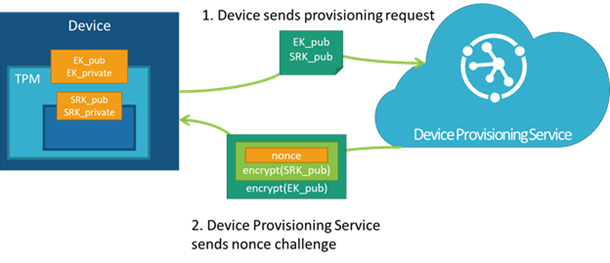
The solution that we integrate on **DeviceOn for Azure (Enterprise Edition)**, leverage **Azure IoT Edge** and **TPM 2.0** to offer secure authentication and private key protected.
TPM, also known as [ISO/IEC 11889](https://www.iso.org/standard/66510.html), is a standard for securely generating and storing cryptographic keys. TPM also refers to a virtual or physical I/O device that interacts with modules that implement the standard. A TPM device can exist as discrete hardware, integrated hardware, a firmware-based module, or a software-based module.
### Securing Your Account with Two-Factor Authentication (2FA)
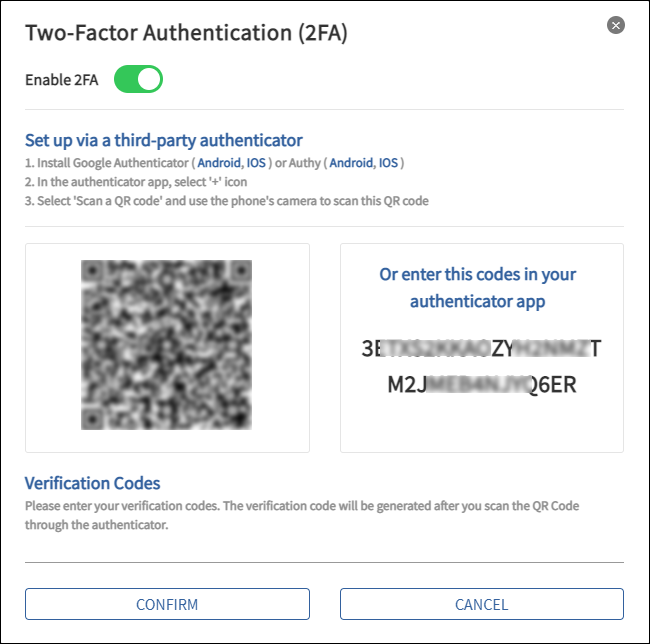
Two-factor authentication (2FA) is an extra layer of security used when logging into websites or apps. With 2FA, you have to log in with your username and password and provide another form of authentication that only you know or have access to.
If you prefer to use an authenticator app for two-step verification, here are a few common authenticator apps that can be found in your mobile device app store:
* **Google Authenticator**
* **Microsoft Authenticator**
* **Authy**
* **LastPass Authenticator**
## Enhancement
### Application Update History
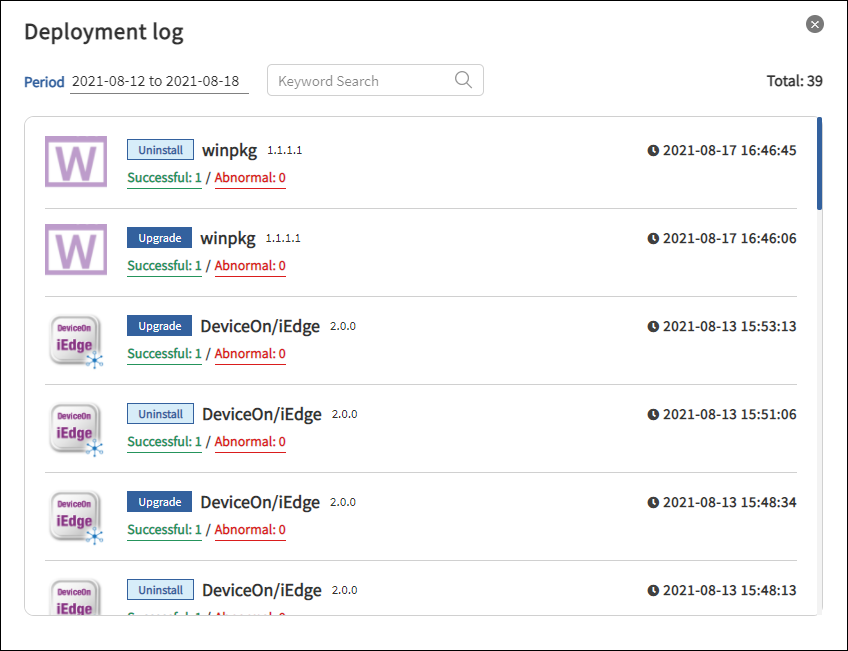
Provide app deployment records to view which device groups, devices the app is deployed to, success and failure history records, including execution time and detailed logs.
### IAMT Library Update
Update [Intel® AMT High-Level API Module](https://software.intel.com/content/www/us/en/develop/download/intel-amt-high-level-api-sdk.html) to **15.0.2.1** to support new hardware platforms and chipsets.
### Remote Desktop & Screenshot for Kiosk mode
For retail or digital signage scenarios, the current system users or devices are running in Kiosk mode. In order to allow administrators to operate remotely in this mode, we have improved Remote Desktop and Screenshot as well.
## Third-Party Updates
* OpenJRE (v1.8.0\_292-1)
* Tomcat (v9.0.50)
* RabbitMQ (v3.8.19), Erlang 24
* PostgreSQL (v10.17)
* MongoDB (v4.2.15)
* Grafana (v7.3.10)
---
# Agent Instructions
This documentation is published with GitBook. GitBook is the documentation platform designed so that both humans and AI agents can read, navigate, and reason over technical content effectively. Learn more at gitbook.com.
## Querying This Documentation
If you need additional information that is not directly available in this page, you can query the documentation dynamically by asking a question.
Perform an HTTP GET request on the current page URL with the `ask` query parameter:
```
GET https://deviceon.gitbook.io/docs/get-started/version-history/version-4.4.2.md?ask=
```
The question should be specific, self-contained, and written in natural language.
The response will contain a direct answer to the question and relevant excerpts and sources from the documentation.
Use this mechanism when the answer is not explicitly present in the current page, you need clarification or additional context, or you want to retrieve related documentation sections.